 Live Wind Tunnel - [source code]
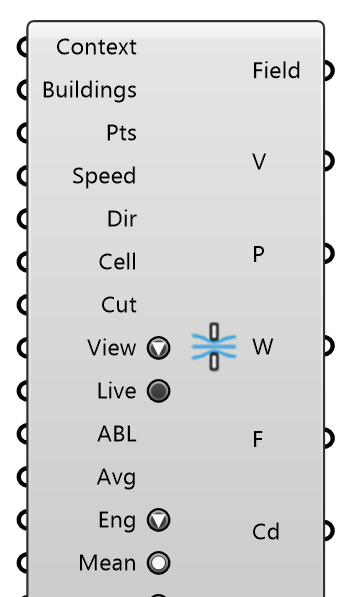
Sketch a site against the wind: a 2D lattice-Boltzmann wind tunnel that runs continuously and paints the flow into the viewport while you move buildings and probes. Nothing restarts when geometry moves. For an urban block, cut the buildings at pedestrian height (Cut Height ≈ 1.75 m) and wire the ABL Flow the wind studies use into ABL: the tunnel then runs in that profile's speed at the cut, in its first wind direction. A SKETCH tool: the site is a section through infinitely tall buildings (no flow over or under anything, no buoyancy), and the solver's viscosity floor runs it at a far lower Reynolds number than real air. Compare variants of a site layout with it, with Mean on (a single frame of a wake is gusty); take numbers you report from an OpenFOAM or LBM Case run.
Input
| Name | Nickname | Description | Type |
|---|---|---|---|
| Context | The surroundings that stay put: terrain, neighbouring buildings, walls, fences. Closed curves are filled, open curves are walls drawn as lines; Breps, extrusions and meshes are cut at Cut Height. A terrain (an open mesh that faces up) is the GROUND instead: it is not cut, every building is cut at Cut Height above its own base, and the flow is drawn at Cut Height above the terrain. Branches are flattened: the site is one scene. | Geometry | |
| Buildings | The buildings (or canopies, signs, pavilions) whose wind load you want. Each gets a live force arrow, and the Force and Cd outputs follow their order. Same geometry rules as Context. | Geometry | |
| Probes | Pts | Points to read the flow at (speed, pressure, vorticity), labelled live in the viewport. | Point |
| Wind Speed | Speed | Inflow speed, m/s. | Number |
| Wind Direction | Dir | Direction the wind blows TOWARDS; only its horizontal part counts. | Vector |
| Cell Size | Cell | Lattice spacing in m. 0 = auto: about 120,000 cells, which steps at an interactive rate on a laptop CPU. Each halving quadruples the work. | Number |
| Cut Height | Cut | Height above the ground the buildings stand on at which Breps and meshes are cut into the 2D site section, m. With a terrain mesh in Context it is above the LOCAL terrain (each building from its own base, the flow drawn that high over the terrain); without, above the highest base among Context and Buildings. Pedestrian level (about 1.75 m) for an urban block; with ABL wired it is also the height the wind profile is read at. | Number |
| View | What the viewport shows: Smoke (dye streaming in from the inflow faces), Speed, Pressure (gauge, against the outflow), Vorticity, or LIC (speed under a line integral convolution of sparse noise: thin white strands gliding along the flow, a picture of the recent pathlines). With Mean on, Smoke, Speed, Pressure, Vorticity and the LIC's colours and strands show their time-mean; compare layouts that way, a single frame of a wake is gusty. | Text | |
| Live | Run the tunnel. Off pauses it and keeps the flow; right-click → Restart flow starts it from rest. | Boolean | |
| ABL | Optional ABL Flow, the component the wind studies and LBM Case take. Wired, it replaces Wind Speed and Wind Direction: the inflow is the log-law profile's speed at Cut Height, blowing in the ABL's first wind direction. The tunnel is 2D, so it carries that one speed; the profile's gradient up the buildings is not modelled. | Generic Data | |
| Average | Avg | Time-mean window in simulated seconds, for the Mean toggle. 0 = auto: ten flow-throughs of the site (its larger side over the wind speed). The mean starts once the flow has developed and restarts when the geometry or the wind direction changes or Mean is switched on; Status says how full it is. | Number |
| Engine | Eng | Where the lattice steps. Auto: the OpenCL GPU when one answers, else the CPU with a remark. GPU: the GPU, and a fallback to the CPU is reported loud, never silent. CPU: every core but one. Switching engines restarts the flow; the Status output names the engine that runs. | Text |
| Mean | Show and output time-means instead of the instantaneous frame: Speed, Pressure and Vorticity averaged over the Average window; the Smoke view shows the time-mean concentration. The window fills from the moment Mean is switched on; the banner says how full it is. | Boolean | |
| Forces | Draw each building's wind-load arrow and label in the viewport. Off by default; the Force and Cd outputs are always computed. | Boolean | |
| Tunnel | Optional: the wind tunnel itself, as a rectangle, box or surface (its plan footprint). The flow is solved over exactly this area and it stays put while Context and Buildings change, so draw it large enough to hold the wake: wind enters on the upwind face and leaves on the downwind one. Unwired, the tunnel is sized around the geometry (three times its larger side). | Geometry |
Output
| Name | Nickname | Description | Type |
|---|---|---|---|
| Field | The tunnel's current frame as a vertex-coloured mesh in the selected View (bake to keep it). | Mesh | |
| Speed | V | Speed at each probe, m/s (empty inside a wall); the time-mean with Mean on. | Number |
| Pressure | P | Gauge pressure at each probe, Pa; the time-mean with Mean on. | Number |
| Vorticity | W | Vorticity at each probe, 1/s (positive = anticlockwise); the time-mean with Mean on. | Number |
| Force | F | Wind load on each building per metre of height, N/m (the site is a section). | Vector |
| Cd | Drag coefficient of each building: drag / (0.5 rho U² frontal width). | Number | |
| Status | S | Lattice, speed and how far the run is from real air. | Text |