 Vector Field Viewer - [source code]
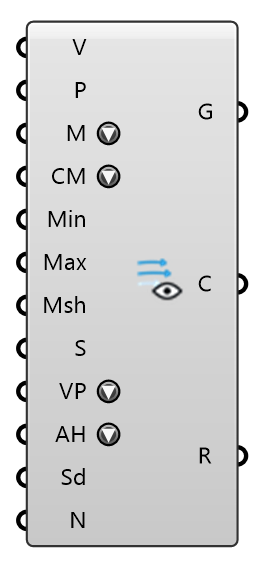
Visualize a probed vector field: colored velocity arrows, a point cloud, a heatmap mesh, streamlines, volumetric smoke, a streamline map (speed heatmap under black arrowed streamlines) or LIC (the heatmap under thin white strands gliding with the flow); pick via Display Mode. Feed the Probe component's points + velocity vectors (Field = U), or any points + vectors. For a field without direction — CO2, temperature, age of air, Cp — use the Scalar Field Viewer.
Input
| Name | Nickname | Description | Type |
|---|---|---|---|
| Velocity | V | Velocity vector per point. | Vector |
| Points | P | Sample points (e.g. the probe points). Empty with a Mesh wired uses the mesh's samples: its vertices when it has one per value (the WRF Probe's Mesh) or its face centres when it has one face per value (the square probe markers of Deconstruct MRT and Deconstruct Wind), in Values order — so mesh-only wiring is complete. | Point |
| Display Mode | M | How to render the field: Vector Field (arrows), Point Cloud, Heatmap Mesh (colors a supplied mesh), Streamlines, Volumetric Smoke, or Streamline Map (a speed heatmap — the Mesh when wired, else the sample points' own grid — under thin black streamlines with direction arrows; pair it with the Blue → Red color map for the classic plan-view figure), or LIC (the same heatmap under a line integral convolution of sparse noise: thin white strands gliding along the horizontal flow; the points must form a horizontal layer, such as the case's pedestrian probe lattice). | Text |
| Color Map | CM | Color ramp for the speed coloring (the same ramps the Flex Legend offers). | Text |
| Min Speed | Min | Lower end of the color range / filter (m/s). Empty = data minimum. | Number |
| Max Speed | Max | Upper end of the color range / filter (m/s). Empty = data maximum. | Number |
| Mesh | Msh | Surface to color for Heatmap Mesh and Streamline Map modes. A mesh with faces is subdivided to the samples' spacing and each vertex is read from the samples that lie on its own face, so a wall is not blended from the ground and the roof; faces that meet at a crease keep separate colours. A mesh of bare vertices takes the nearest sample. Ignored in the other modes. | Mesh |
| Scale | S | Arrow length scale (Vector Field mode). | Number |
| Vector Plane | VP | Flattens every vector into the horizontal plane (normal +Z), for a plan-view read of the flow: 3D keeps the vectors as they are; Flat XY drops the vertical component, so lengths and colors become HORIZONTAL speed; Flat XY (Keep Speed) lays the vectors flat but rescales each to its original magnitude, so only the direction changes. Flattening feeds the speeds used for coloring and the Range output too, so the legend keeps matching what is drawn. | Text |
| Arrowhead Scaling | AH | How each arrow's head size follows its point's speed (Vector Field mode): Fixed (constant screen size, speed shows in shaft length only), Linear (head ∝ speed), Square Root (compressed — slow arrows keep visible heads), or Cubic (exaggerated — only the fast flow gets big heads). | Text |
| Seeds | Sd | Streamline seed points (Streamlines and Streamline Map modes). Each seed is traced both upstream and downstream, so a seed over a doorway or courtyard shows the full path of the air that passes through it. Empty = automatic seeding on the upwind face of the field bounds, derived from the mean flow direction. | Point |
| Seed Count | N | Maximum automatic seed count when no Seeds are supplied (Streamlines and Streamline Map modes). | Integer |
Output
| Name | Nickname | Description | Type |
|---|---|---|---|
| Geometry | G | Colored viz geometry for baking: arrow lines, points, or the colored mesh. | Generic Data |
| Colors | C | Color per element (aligned with Geometry). | Colour |
| Range | R | The speed range the colors span (m/s): Min/Max Speed where supplied, otherwise the data minimum/maximum. Feed it to the Flex Legend component for a matching legend, or into a second Vector Field Viewer's Min/Max Speed to color two fields on one scale. | Domain |